📄 Ads.txt Manager Pro - Easy Ads.txt File Management
Ads.txt Manager Pro is a powerful WordPress plugin that allows you to create, edit, and manage your ads.txt file directly from WordPress admin without using FTP or file managers.
🎯 What is ads.txt?
Ads.txt (Authorized Digital Sellers) is an IAB Tech Lab initiative that helps prevent unauthorized ad inventory sales and protects your advertising revenue. It's required by Google AdSense and recommended by all major ad networks.
✨ Key Features
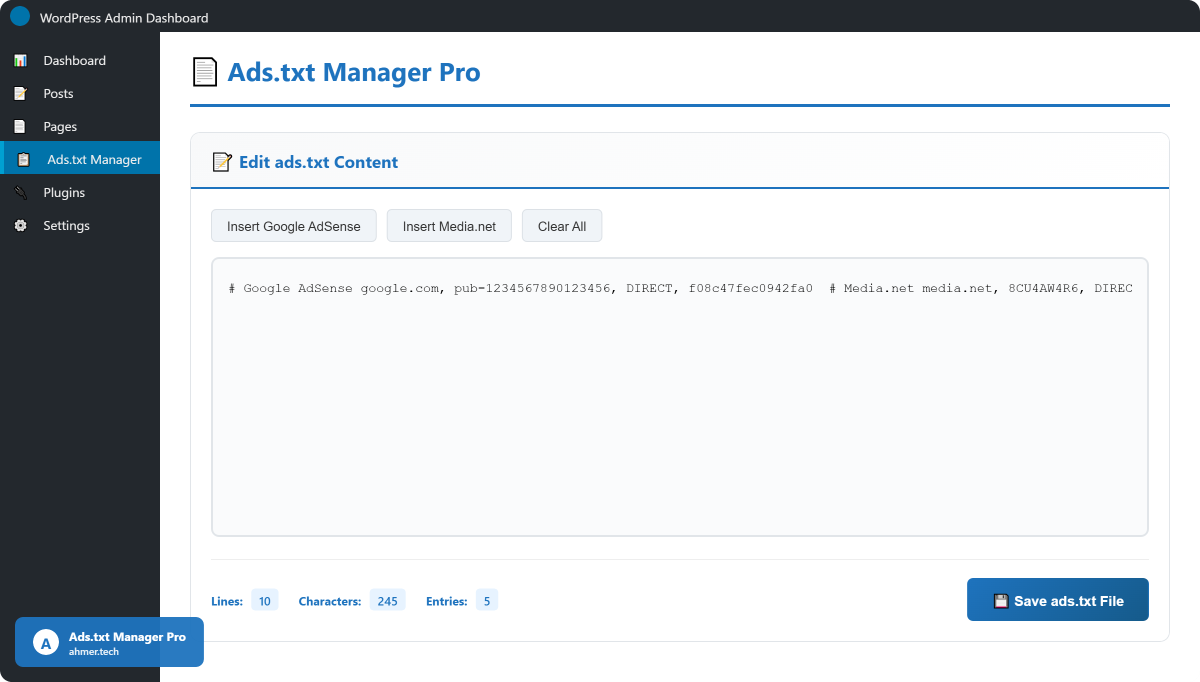
- 📝 Built-in Editor - Clean, intuitive editor with line counter
- ⚡ Quick Templates - One-click insert for Google AdSense and Media.net
- 💾 Auto Backup - Automatic backups created before every save (last 10 kept)
- ✓ Format Validation - Basic validation to prevent common errors
- 📊 Live Statistics - Real-time counter for lines, characters, and entries
- 📥 Download Backup - Download your current ads.txt file anytime
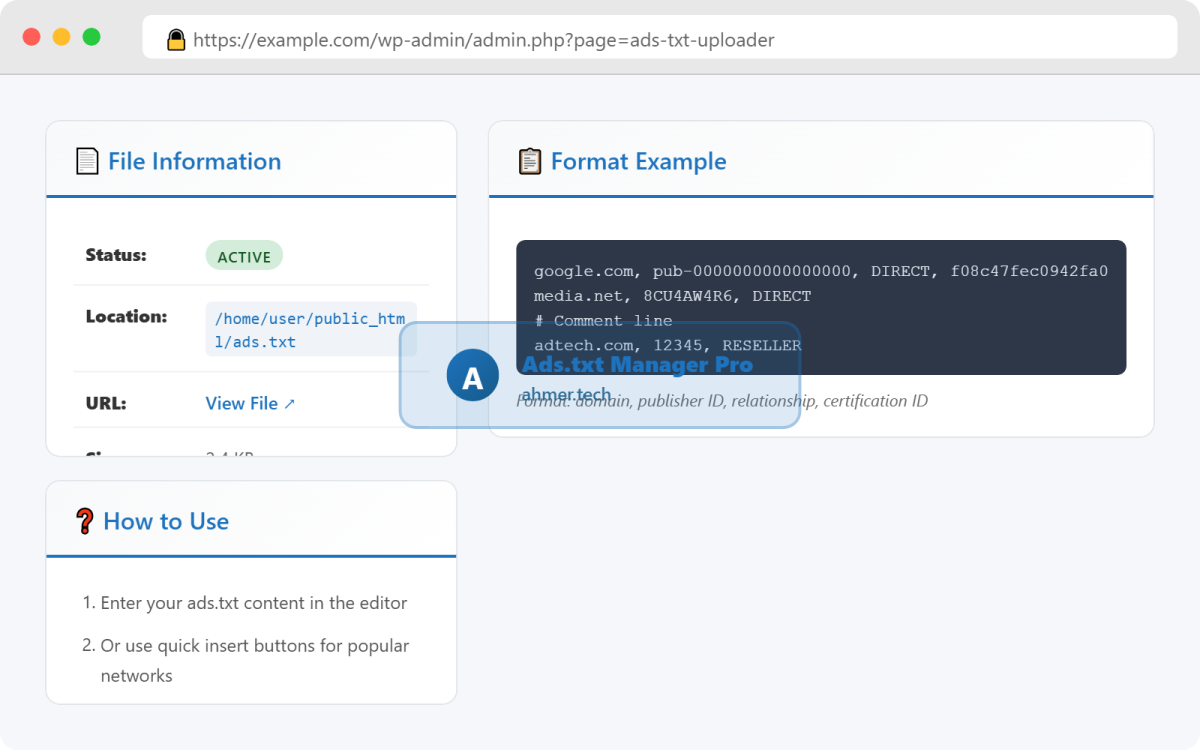
- 📄 File Information - View status, size, location, and modification date
- 🔒 Secure - Nonce verification, capability checks, input sanitization
- 📱 Fully Responsive - Works perfectly on desktop, tablet, and mobile
- 🌐 Translation Ready - Includes POT file for easy translation
- ⌨️ Keyboard Shortcuts - Ctrl+S to save, Ctrl+K to clear
- 💡 Auto-Save Draft - Prevents data loss with auto-save to localStorage
🚀 How It Works
- Install and activate the plugin
- Go to Ads.txt Manager in WordPress admin
- Enter your ads.txt content or use quick insert templates
- Click Save ads.txt File button
- Your ads.txt file is instantly live at yoursite.com/ads.txt
⚡ Quick Insert Templates
Google AdSense Template
One-click insertion of properly formatted AdSense entry:
google.com, pub-0000000000000000, DIRECT, f08c47fec0942fa0
Media.net Template
Pre-formatted Media.net entries (DIRECT and RESELLER):
media.net, 8CU000000, DIRECT
media.net, 8CU000000, RESELLER
Simply click the button, replace the placeholder ID with your actual publisher ID, and save!
💾 Smart Backup System
- Automatic backup created before each save
- Backups stored in
/wp-content/ads-txt-backups/ - Last 10 backups are kept automatically
- Download current file as backup anytime
- Restore from backup by copy-pasting content
✓ Format Validation
The plugin validates your ads.txt entries to ensure:
- Minimum 3 fields per line (domain, publisher ID, relationship)
- Proper comma separation
- Valid comment lines (starting with #)
- No trailing commas or extra spaces
Warnings are displayed if issues are found, but you can still save (in case of special requirements).
📊 Live Statistics
Real-time stats displayed while editing:
- Lines: Total number of lines
- Characters: Total character count
- Entries: Number of valid ads.txt entries (excludes comments and blank lines)
🔒 Security Features
- WordPress nonce verification on all actions
- Capability checks (requires 'manage_options')
- Complete input sanitization
- Secure file write operations with permission checks
- Safe URL redirects to prevent XSS
- No SQL queries (file-based only)
📋 Standard Ads.txt Format
The plugin supports the official IAB ads.txt specification:
domain, publisher_id, relationship, certification_id
Field Descriptions:
- domain: The ad system domain (e.g., google.com)
- publisher_id: Your unique publisher ID
- relationship: DIRECT (you sell directly) or RESELLER (third-party sells)
- certification_id: TAG ID from Trustworthy Accountability Group (optional)
Complete Example:
# Authorized Digital Sellers for example.com

# Google AdSense
google.com, pub-1234567890123456, DIRECT, f08c47fec0942fa0

# Media.net
media.net, 8CU4AW4R6, DIRECT
media.net, 8CU4AW4R6, RESELLER

# Other Networks
adtech.com, 12345, RESELLER
appnexus.com, 7890, RESELLER, f5ab79cb980f11d1
📄 File Information Panel
View detailed information about your ads.txt file:
- Status: Active/Not Found indicator
- Location: Full server path
- URL: Direct link to view file
- Size: File size in human-readable format
- Modified: Last modification date and time
- Writable: Permission status indicator
⌨️ Keyboard Shortcuts
- Ctrl/Cmd + S: Save ads.txt file
- Ctrl/Cmd + K: Clear editor (with confirmation)
💡 Smart Features
Auto-Save Draft
Your work is automatically saved to browser's localStorage every 2 seconds. If you accidentally close the browser, you'll be prompted to restore your draft on next visit.
Copy to Clipboard
Quickly copy file paths and URLs with one-click copy buttons.
Responsive Design
Fully responsive interface that works perfectly on all screen sizes - desktop, tablet, and mobile.
🌐 Compatibility
- WordPress: 5.0 to 6.4+ (tested)
- PHP: 7.2, 7.4, 8.0, 8.1, 8.2+
- Browsers: Chrome, Firefox, Safari, Edge, Opera
- Themes: Compatible with all WordPress themes
- Plugins: Works with caching plugins (may need cache clear)
- Hosting: Shared, VPS, Dedicated, Cloud
- Multisite: Yes (each site has own ads.txt)
📦 What's Included
- Plugin files (clean, well-documented code)
- Complete HTML documentation (index.html)
- WordPress readme.txt file
- Translation POT file
- GPL v2 License
- Free lifetime updates
- Premium email support
🎯 Who Needs This?
- Publishers using Google AdSense
- Websites monetized with Media.net
- Blog owners using multiple ad networks
- Anyone required to have ads.txt by ad partners
- Webmasters who want easy ads.txt management
- Sites that don't have FTP access
📝 Changelog
Version 1.0.0 - December 2024
- Initial release
- Built-in ads.txt editor with syntax helper
- Quick insert templates (Google AdSense, Media.net)
- Automatic backup system (last 10 backups)
- Format validation with warnings
- Live statistics counter (lines, chars, entries)
- Download backup feature
- File information display panel
- Security features (nonce, sanitization, capability checks)
- Keyboard shortcuts (Ctrl+S, Ctrl+K)
- Auto-save draft to localStorage
- Copy to clipboard helpers
- Fully responsive design
- Translation ready with POT file
- Complete documentation included
🔄 Regular Updates
We actively maintain and update this plugin with:
- Bug fixes and improvements
- WordPress compatibility updates
- New ad network templates
- Feature enhancements
- Security patches
📞 Premium Support
Purchase includes premium support:
- Email support within 24-48 hours
- Installation assistance
- Configuration help
- Bug reporting and fixes
- Feature requests consideration
Thank you for choosing Ads.txt Manager Pro!
📝 Editor Features
- Clean, intuitive text editor
- Monospace font for code clarity
- Line counter display
- Character counter
- Entry counter (excludes comments)
- Syntax highlighting friendly
- Auto-expanding textarea
- Placeholder text with instructions
⚡ Quick Actions
- Insert Google AdSense template
- Insert Media.net template
- Clear all content (with confirmation)
- Save with keyboard shortcut (Ctrl+S)
- Download current file as backup
- Copy file path to clipboard
💾 Backup System
- Automatic backup before each save
- Last 10 backups retained automatically
- Backups stored in /wp-content/ads-txt-backups/
- Download backup as .txt file
- Timestamped backup filenames
- Automatic cleanup of old backups
✓ Validation
- Format validation on save
- Checks for minimum required fields
- Validates comma separation
- Detects invalid entries
- Displays warnings (allows save anyway)
- Helps prevent common mistakes
📊 Statistics
- Real-time line counter
- Character count display
- Valid entries counter
- Updates as you type
- Color-coded badges
📄 File Information
- File existence status (Active/Not Found)
- Full server file path
- Public URL with view link
- File size (human readable)
- Last modification date/time
- Write permission status
🔒 Security
- WordPress nonce verification
- Capability checks (manage_options)
- Input sanitization (wp_unslash)
- Output escaping (esc_html, esc_attr)
- Secure file operations
- Permission validation
- Safe redirects (wp_safe_redirect)
- No SQL injection risk (file-based)
🎨 User Interface
- Modern, clean design
- Card-based layout
- Gradient headers
- Intuitive toolbar
- Color-coded status badges
- Responsive grid layout
- Professional typography
- Smooth animations
📱 Responsive Design
- Desktop optimized (1400px+)
- Tablet friendly (768px - 1200px)
- Mobile compatible (below 768px)
- Touch-friendly buttons
- Adaptive layouts
- Readable fonts on all screens
⌨️ Keyboard Features
- Ctrl/Cmd + S to save
- Ctrl/Cmd + K to clear
- Tab key support
- Standard text editing shortcuts
💡 Smart Features
- Auto-save draft to localStorage
- Restore draft on browser close/crash
- Copy to clipboard helpers
- One-click file path copy
- Format examples in help panel
- Inline documentation
🌐 Internationalization
- Translation ready
- POT file included
- All strings translatable
- Proper text domain usage
- RTL support ready
🔧 Developer Features
- Clean, documented code
- WordPress coding standards
- Object-oriented PHP
- Separate class files
- External CSS/JS files
- Action and filter hooks
- Extensible architecture
📦 Additional Features
- No database tables created
- No external API calls
- No third-party dependencies
- Lightweight (under 100KB total)
- Fast performance
- Clean uninstall (removes backups)
- Multisite compatible
- Works with caching plugins
Server Requirements
- WordPress Version: 5.0 or higher (tested up to 6.4)
- PHP Version: 7.2 or higher (tested up to 8.2)
- MySQL Version: 5.6 or higher (no database used, but WordPress requirement)
- Web Server: Apache, Nginx, or any WordPress-compatible server
- Memory Limit: 64MB minimum (128MB recommended)
File System Requirements
- Root directory (public_html) must be writable
- /wp-content/ directory must be writable (for backups)
- File permissions: 755 for directories, 644 for files
- No .htaccess blocking of ads.txt file
WordPress Requirements
- WordPress core installation (not WordPress.com)
- Admin access with 'manage_options' capability
- Standard WordPress file structure
- No conflicting ads.txt plugins
Browser Requirements
- Google Chrome (latest version)
- Mozilla Firefox (latest version)
- Microsoft Edge (latest version)
- Safari (latest version)
- Opera (latest version)
- JavaScript must be enabled
- Cookies enabled for localStorage
Hosting Compatibility
- Shared hosting supported
- VPS/Dedicated servers supported
- Cloud hosting (AWS, Google Cloud, DigitalOcean)
- Managed WordPress hosting (WP Engine, Kinsta, etc.)
- cPanel/Plesk based hosting
Plugin Compatibility
- Compatible with all major caching plugins
- Works with all WordPress themes
- No conflicts with popular plugins
- Compatible with security plugins
- Works with backup plugins
Optional (Recommended)
- FTP/SFTP access (for troubleshooting file permissions)
- cPanel or hosting control panel access
- Basic knowledge of ads.txt format
- Ad network publisher accounts (AdSense, Media.net, etc.)
Not Required
- No external API keys needed
- No third-party service accounts
- No additional plugin dependencies
- No special server modules
- No SSL certificate required (but recommended for security)
Multisite Compatibility
- WordPress Multisite supported
- Each site manages its own ads.txt file
- Network admin access not required
- Individual site activation
🔧 Installation
Method 1: WordPress Admin (Recommended)
- Download the ads-txt-uploader.zip file
- Log in to your WordPress admin dashboard
- Go to Plugins → Add New
- Click the Upload Plugin button at the top
- Click Choose File and select the downloaded ZIP file
- Click Install Now
- After installation, click Activate Plugin
- You'll see "Ads.txt Manager" in the admin menu
Method 2: FTP Upload
- Extract the ads-txt-uploader.zip file on your computer
- Connect to your server via FTP client (FileZilla, etc.)
- Navigate to /wp-content/plugins/ directory
- Upload the extracted ads-txt-uploader folder
- Go to WordPress Admin → Plugins
- Find Ads.txt Manager Pro in the list
- Click Activate
📝 Creating Your First Ads.txt File
- After activation, click Ads.txt Manager in the WordPress admin menu
- If you already have an ads.txt file, it will load automatically
- If not, the editor will be blank - ready for new content
- Choose one of these options:
Option A: Use Quick Templates
- Click Insert Google AdSense button for AdSense template
- Or click Insert Media.net for Media.net template
- Replace the placeholder ID (pub-0000... or 8CU000...) with your actual publisher ID
- Click 💾 Save ads.txt File
- Success message will confirm file creation
Option B: Manual Entry
- Type or paste your ads.txt content in the editor
- Follow this format:
domain, publisher-id, DIRECT/RESELLER, certification-id - Add comments with # symbol (optional)
- Click 💾 Save ads.txt File
✏️ Editing Existing File
- Go to Ads.txt Manager
- Your existing ads.txt content will load automatically
- Make your changes in the editor
- Click 💾 Save ads.txt File
- A backup is automatically created before saving
💾 Using the Backup System
Automatic Backups
- Backup is created automatically before each save
- Stored in:
/wp-content/ads-txt-backups/ - Last 10 backups are kept
- Filename format:
ads-txt-YYYY-MM-DD-HH-MM-SS.txt
Download Backup
- Look at the File Information panel (right sidebar)
- Click 📥 Download Backup button
- File will download as
ads-txt-backup-[timestamp].txt - Save this file in a safe location
Restore from Backup
- Open your backup file in a text editor
- Copy all content
- Go to Ads.txt Manager
- Paste content in the editor
- Click 💾 Save ads.txt File
⌨️ Keyboard Shortcuts
- Ctrl + S (or Cmd + S on Mac): Save ads.txt file
- Ctrl + K (or Cmd + K on Mac): Clear editor (with confirmation)
- Tab: Insert tab character
📋 Format Guidelines
Basic Format
domain.com, publisher-id, DIRECT, certification-id
Example Entries
# Google AdSense
google.com, pub-1234567890123456, DIRECT, f08c47fec0942fa0

# Media.net
media.net, 8CU4AW4R6, DIRECT
media.net, 8CU4AW4R6, RESELLER

# Comment lines
# Add explanatory comments with # symbol
Field Explanations
- domain: Ad system domain (e.g., google.com)
- publisher-id: Your unique ID from the ad network
- DIRECT: You sell inventory directly
- RESELLER: Third-party sells on your behalf
- certification-id: TAG ID (optional, from Trustworthy Accountability Group)
🔍 Verifying Your File
- After saving, visit:
https://yoursite.com/ads.txt - You should see your ads.txt content displayed as plain text
- Check the File Information panel for status
- Click View File ↗ link to open in new tab
🆘 Troubleshooting
Problem: File Not Saving
Solution:
- Check if root directory has write permissions (755 or 775)
- Contact hosting support to fix permissions
- Check File Information panel for "Writable" status
Problem: File Not Found at URL
Solution:
- Clear browser cache
- Clear WordPress cache if using caching plugin
- Check .htaccess for blocking rules
- Verify file exists in File Information panel
Problem: Validation Warnings
Solution:
- Ensure each line has at least 3 comma-separated fields
- Remove extra spaces or trailing commas
- Comments must start with # symbol
- You can still save despite warnings
Problem: Permission Denied Error
Solution:
- You need WordPress Administrator role
- User must have 'manage_options' capability
- Contact site administrator for access
💡 Best Practices
- Always download a backup before major changes
- Add comments to identify different ad networks
- Keep ads.txt updated when adding/removing networks
- Verify file is accessible after each save
- Use DIRECT for direct relationships, RESELLER for indirect
- Include certification ID when provided by ad network
- Test your ads.txt URL after setup
🔗 Adding to Footer Menu (Optional)
- Go to Appearance → Menus
- Click Custom Links
- URL:
https://yoursite.com/ads.txt - Link Text:
Ads.txt - Click Add to Menu
- Save menu
📞 Getting Support
If you need help:
- Check the included documentation (documentation/index.html)
- Review this instructions section
- Email support with detailed description of issue
- Include WordPress version, PHP version, and error messages