🚀 MKM Bix - Premium Magazine & Blog WordPress Theme
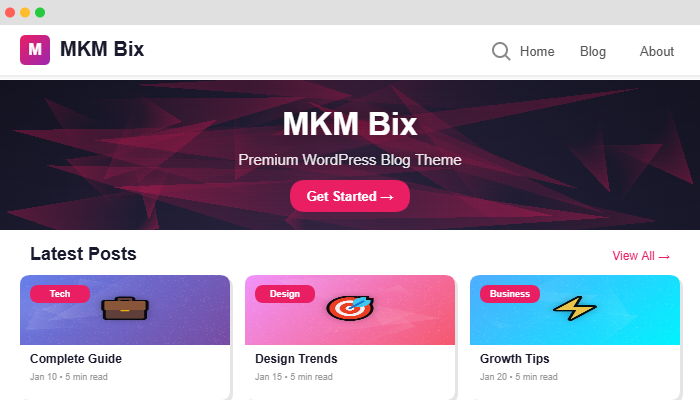
MKM Bix is a modern, lightweight, and highly customizable WordPress theme designed for magazines, blogs, news websites, and content creators. Built with performance and SEO in mind, it offers stunning layouts, advanced customization options, and seamless user experience across all devices.
✨ KEY FEATURES
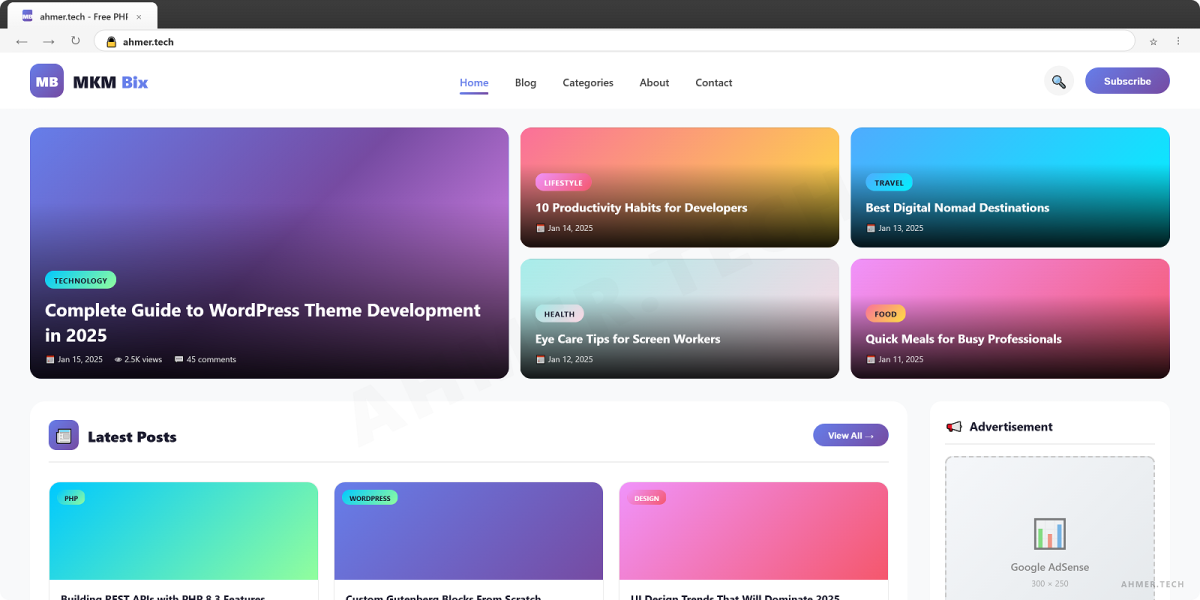
- 🎨 Beautiful Homepage Layouts - Hero section, featured slider, full content display, grid layouts
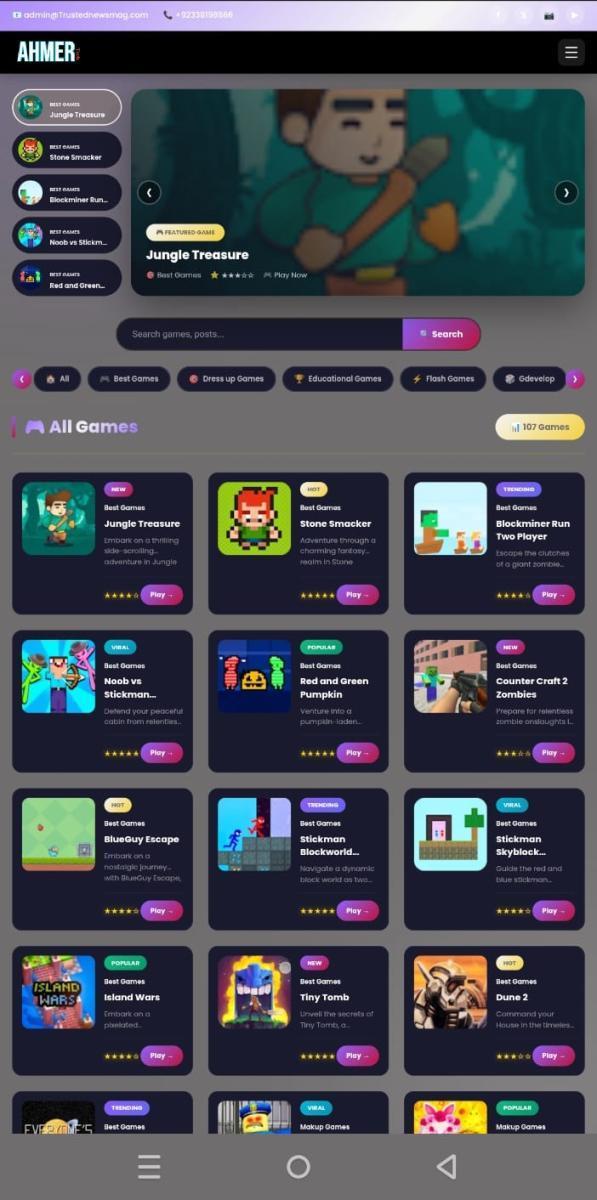
- 📱 100% Mobile Responsive - Perfect on desktop, tablet, and mobile (2x2 grid on small screens)
- 🔍 Advanced SEO Optimization - Custom meta box, Schema markup, Open Graph, Twitter Cards
- ⚡ Lightning Fast Performance - Optimized CSS/JS, lazy loading, minimal dependencies
- 🎯 Smart Ad Management - 9+ ad positions with show/hide controls
- 🛠️ Powerful Theme Settings - Comprehensive admin panel for complete control
- 📊 Analytics Integration - Google Analytics, Google Tag Manager, Facebook Pixel
- 🎭 Custom Widgets - Multiple widget areas (sidebar, footer, ads)
- 💬 Social Media Integration - 12+ social platforms with beautiful icons
- 🌐 Translation Ready - Fully compatible with WPML and Polylang
- ♿ Accessibility Compliant - WCAG 2.1 AA standards, keyboard navigation
- 🎨 Color Customization - Unlimited color schemes with live preview
🎯 HOMEPAGE FEATURES
- Hero Section - Eye-catching hero with custom background, overlay, dual buttons
- Featured Slider - Auto-play slider with touch support, arrows, dots navigation
- Full Content Display - Showcase selected posts/pages with complete content
- Stylish Grid Layout - 2/3/4 column responsive grid with hover effects
- Smart Sidebar - Left/right position, show/hide on different page types
- Custom Excerpt Length - Control excerpt words for grid items
🔍 SEO POWERHOUSE
- Custom Meta Box - Per-post/page SEO title, description, keywords, noindex
- Google Preview - Real-time preview of how posts appear in search results
- Schema Markup - Article, Organization, BreadcrumbList, Blog schemas
- Open Graph Tags - Perfect Facebook, LinkedIn sharing with images
- Twitter Cards - Beautiful Twitter previews with large images
- Breadcrumbs - SEO-friendly breadcrumb navigation
- Canonical URLs - Automatic canonical tag generation
- Focus Keyword - Track main keyword for each post
💰 AD MANAGEMENT SYSTEM
Monetize your website with 9 strategic ad positions:
- Header Ad
- Below Header Ad
- Before Content Ad
- Content Middle Ad (auto-inserted)
- After Content Ad
- Sidebar Top Ad
- Sidebar Bottom Ad
- Before Footer Ad
- Footer Ad
Each position has individual enable/disable control. Supports Google AdSense, custom HTML, image ads.
🎨 CUSTOMIZATION OPTIONS
- Colors - Primary color, secondary color, text colors, background colors
- Typography - Google Fonts integration, font sizes, line heights
- Layouts - Boxed/full-width, sidebar positions, grid columns
- Header - Custom logo, site title styling, header layout
- Footer - Custom copyright text, footer widgets, social links
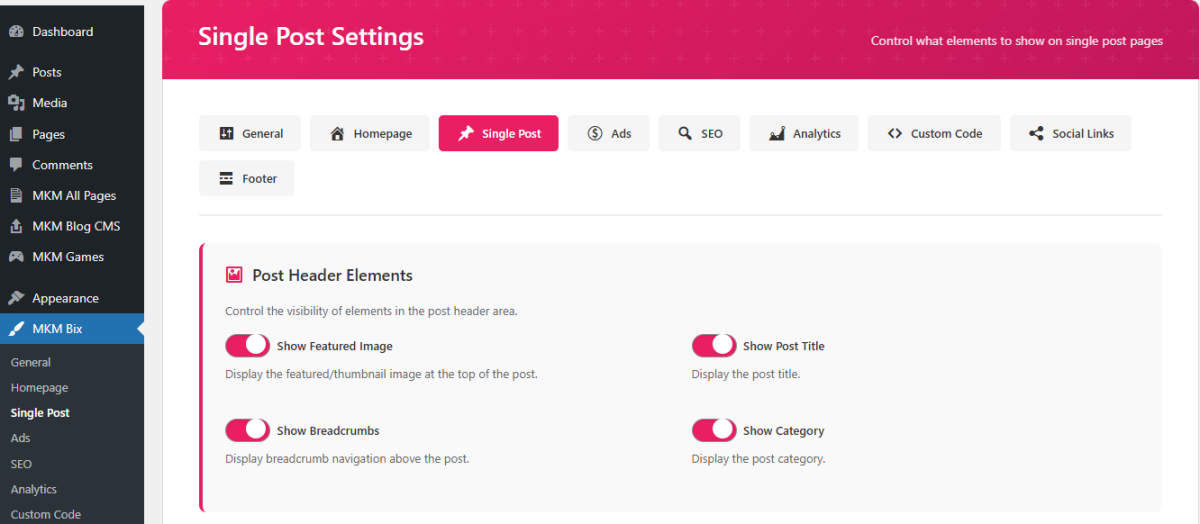
- Single Post - Show/hide elements (featured image, author, date, tags, etc.)
📊 ANALYTICS & TRACKING
- Google Analytics - Easy GA4 integration with tracking ID
- Google Tag Manager - Complete GTM support (head + body)
- Facebook Pixel - Track conversions and retargeting
- Search Console - Verification meta tags (Google, Bing, Yandex, Pinterest)
- Post Views Counter - Track and display post views
- Reading Time - Calculate and display estimated reading time
🌐 SOCIAL MEDIA FEATURES
- Social Share Buttons - 7 platforms (Facebook, Twitter, WhatsApp, LinkedIn, Pinterest, Telegram, Email)
- Social Links - 12+ platforms in header/footer (Facebook, Twitter, Instagram, YouTube, LinkedIn, Pinterest, TikTok, Reddit, GitHub, Discord, Telegram, WhatsApp)
- Beautiful Icons - SVG icons with hover effects
- Customizable Position - Show in header, footer, or both
📱 MOBILE OPTIMIZATION
- Mobile Menu - Smooth slide-in navigation with submenu support
- Touch Gestures - Swipe support for slider on touch devices
- Optimized Grid - Auto 2x2 layout on mobile for better UX
- Hidden Elements - Auto-hide meta, excerpts on small screens
- Fast Loading - Optimized images, lazy loading, minimal scripts
🛠️ DEVELOPER FRIENDLY
- Clean Code - Well-commented, organized, follows WordPress coding standards
- Child Theme Ready - Easy customization without losing updates
- Action Hooks - Multiple hooks for custom functionality
- Filter Hooks - Modify outputs without editing core files
- Custom Functions - Reusable helper functions for developers
- Translation Ready - POT file included, RTL support
🎁 WHAT'S INCLUDED
- ✅ WordPress Theme Files
- ✅ Comprehensive Documentation (PDF + HTML)
- ✅ Installation Guide
- ✅ Demo Content (XML)
- ✅ Widget Settings Export
- ✅ Theme Options Backup
- ✅ Video Tutorials
- ✅ 6 Months Support
- ✅ Lifetime Updates
⚙️ TECHNICAL SPECIFICATIONS
- WordPress Version - 5.0+ (Tested up to 6.7)
- PHP Version - 7.4+ (Recommended 8.0+)
- MySQL Version - 5.6+
- Responsive - Yes (Desktop, Tablet, Mobile)
- Browser Compatibility - Chrome, Firefox, Safari, Edge
- Page Speed - 90+ on PageSpeed Insights
- File Size - Lightweight (~2MB)
📚 DOCUMENTATION & SUPPORT
Comprehensive documentation included with:
- Step-by-step installation guide
- Theme settings explanation
- Customization tutorials
- Troubleshooting tips
- FAQ section
- Video walkthroughs
Support: Email support within 24 hours (business days). Support includes:
- Installation assistance
- Bug fixes
- Theme usage questions
- Configuration help
Note: Customization services available separately.
🔄 REGULAR UPDATES
We continuously improve MKM Bix with:
- WordPress compatibility updates
- Security patches
- New features based on feedback
- Performance improvements
- Bug fixes
🌟 WHY CHOOSE MKM BIX?
- ✅ Performance First - Built for speed and efficiency
- ✅ SEO Optimized - Rank higher in search engines
- ✅ User Friendly - Easy for beginners, powerful for pros
- ✅ Regular Updates - Continuous improvements and new features
- ✅ Quality Support - Responsive and helpful team
- ✅ Great Value - Premium features at affordable price
📞 NEED HELP?
Check our documentation first, then contact us through the support tab. We typically respond within 24 hours during business days.
Thank you for choosing MKM Bix! 🎉
- Responsive Design (Desktop, Tablet, Mobile)
- SEO Optimized with Schema Markup
- Custom Meta Box for SEO Settings
- Google Search Preview in Admin
- 9 Ad Positions with Controls
- Featured Slider with Autoplay
- Hero Section with Custom Background
- Grid Layout (2/3/4 Columns)
- Full Content Display Option
- Smart Sidebar (Left/Right Position)
- Google Analytics Integration
- Google Tag Manager Support
- Facebook Pixel Integration
- Social Share Buttons (7 Platforms)
- Social Media Links (12+ Platforms)
- Post Views Counter
- Reading Time Calculator
- Related Posts Widget
- Breadcrumb Navigation
- Custom Comment Design
- Translation Ready (WPML Compatible)
- RTL Support
- Child Theme Ready
- WooCommerce Compatible
- Widget Areas (Sidebar, Footer, Ads)
- Custom Logo Support
- Color Customization
- Typography Options
- Lazy Loading Images
- Performance Optimized
- Cross-Browser Compatible
- WCAG 2.1 AA Accessibility
- Maintenance Mode
- Custom Scripts (Header/Footer)
- Search Console Verification
- Demo Content Included
- Comprehensive Documentation
- 6 Months Support
- Lifetime Updates
- WordPress: Version 5.0 or higher (Tested up to 6.7)
- PHP: Version 7.4 or higher (Recommended: PHP 8.0+)
- MySQL: Version 5.6 or higher
- Memory Limit: Minimum 64MB (Recommended: 128MB+)
- Upload Size: Minimum 10MB
- Browser: Chrome, Firefox, Safari, Edge (Latest versions)
- Server: Apache or Nginx
- SSL: Recommended for security
Optional but Recommended:
- Imagick or GD Library for image processing
- Curl for external API requests
- Pretty Permalinks enabled
- Gzip compression enabled
🚀 INSTALLATION GUIDE
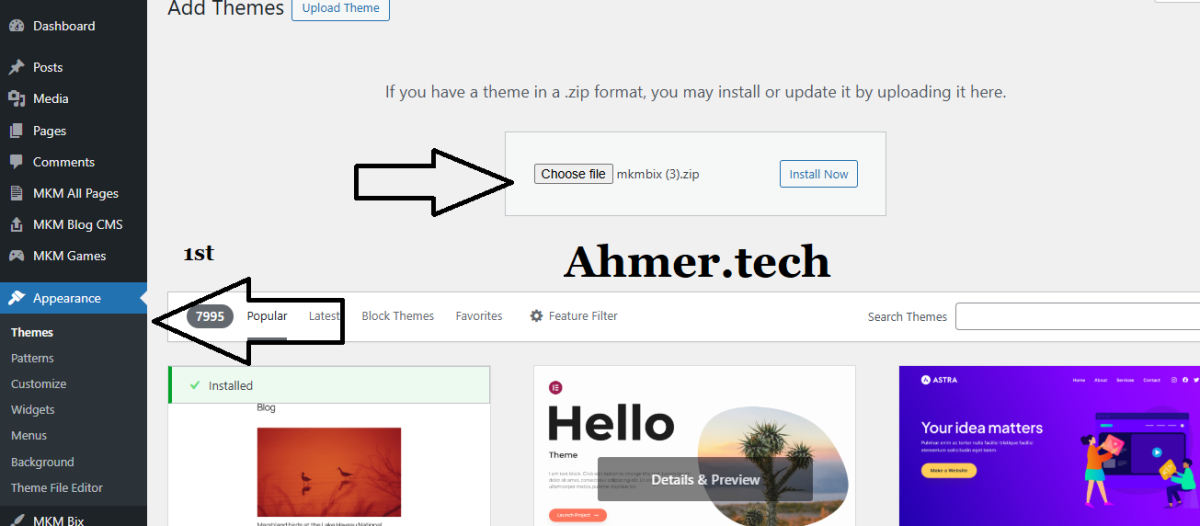
Method 1: WordPress Admin Dashboard (Recommended)
- Log in to your WordPress Admin Dashboard
- Navigate to Appearance → Themes → Add New
- Click "Upload Theme" button
- Choose the mkm-bix.zip file from your downloads
- Click "Install Now"
- After installation, click "Activate"
- Done! The theme is now active
Method 2: FTP Upload
- Unzip the mkm-bix.zip file on your computer
- Connect to your server via FTP (FileZilla, etc.)
- Navigate to /wp-content/themes/
- Upload the mkm-bix folder
- Go to WordPress Admin → Appearance → Themes
- Find MKM Bix and click Activate
⚙️ INITIAL SETUP
Step 1: Import Demo Content (Optional)
- Install and activate "WordPress Importer" plugin
- Go to Tools → Import → WordPress
- Upload the demo-content.xml file (included in package)
- Check "Download and import file attachments"
- Click "Submit"
Step 2: Configure Theme Settings
- Go to MKM Theme Settings in admin menu
- Configure homepage settings (Hero, Slider, Grid)
- Set up SEO options (Meta tags, Schema markup)
- Add your Analytics IDs (GA, GTM, FB Pixel)
- Configure ad positions
- Set social media links
- Customize colors and typography
- Click "Save Changes"
Step 3: Setup Menus
- Go to Appearance → Menus
- Create a new menu (e.g., "Main Menu")
- Add pages/posts to menu
- Assign to "Primary Menu" location
- Create another menu for footer (optional)
- Save menu
Step 4: Configure Widgets
- Go to Appearance → Widgets
- Drag widgets to desired areas:
- Main Sidebar - Shows on posts/pages
- Footer Widget 1-4 - Footer columns
- Ad Sidebar - Advertisement area
- Configure each widget settings
- Save changes
Step 5: Set Reading Settings
- Go to Settings → Reading
- Choose homepage display:
- Latest Posts - Shows homepage template
- Static Page - Choose custom page
- Set posts per page (recommended: 6, 9, or 12)
- Save changes
Step 6: Configure Permalinks
- Go to Settings → Permalinks
- Select "Post name" (SEO friendly)
- Or use custom structure: /%postname%/
- Click "Save Changes"
🎨 CUSTOMIZATION GUIDE
Homepage Customization
- Hero Section:
- Enable/disable in Theme Settings
- Set title, subtitle, content
- Add background image or color
- Configure overlay opacity
- Add action buttons with links
- Featured Slider:
- Enable/disable slider
- Select posts to feature
- Set slide count (3-10 recommended)
- Configure autoplay speed
- Show/hide arrows and dots
- Full Content Display:
- Enable in Theme Settings
- Select specific posts/pages
- Set maximum items to show
- Content appears with featured image
- Grid Layout:
- Choose columns (2, 3, or 4)
- Set posts per page
- Control excerpt word count
- Show/hide meta (date, author, category)
- Toggle thumbnail display
SEO Optimization
- Per Post/Page SEO:
- Edit any post/page
- Scroll to "SEO Settings" meta box
- Enter focus keyword
- Write custom SEO title (50-60 chars)
- Write meta description (150-160 chars)
- Add meta keywords (optional)
- Preview Google search appearance
- Enable noindex if needed
- Global SEO Settings:
- Go to Theme Settings → SEO Tab
- Enable/disable Schema markup
- Enable/disable Open Graph tags
- Enable/disable Twitter Cards
- Set default meta description
- Add site logo for schema
Ad Management
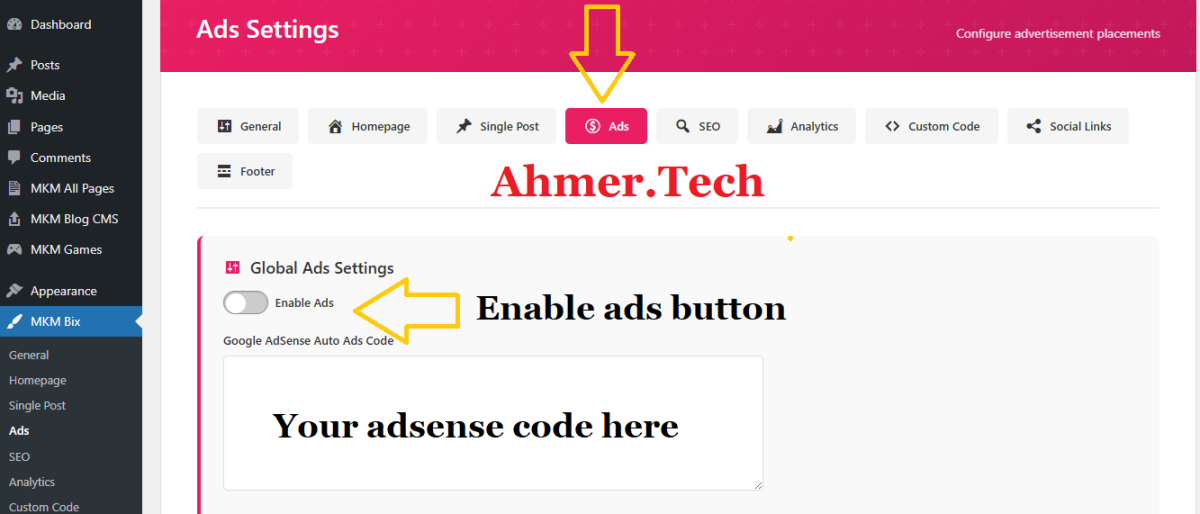
- Go to Theme Settings → Ads Tab
- Enable global ads toggle
- For each ad position:
- Enable/disable individually
- Paste ad code (AdSense, HTML, etc.)
- Preview on frontend
- Available positions:
- Header, Below Header
- Before Content, Content Middle, After Content
- Sidebar Top, Sidebar Bottom
- Before Footer, Footer
Analytics Setup
- Go to Theme Settings → Analytics Tab
- Google Analytics:
- Enable GA tracking
- Enter GA4 Measurement ID (G-XXXXXXXXXX)
- Google Tag Manager:
- Enable GTM
- Enter Container ID (GTM-XXXXXXX)
- Facebook Pixel:
- Enable FB Pixel
- Enter Pixel ID
- Save changes and verify tracking
🔧 TROUBLESHOOTING
Issue: Theme not uploading
Solution:
- Check PHP upload_max_filesize (increase to 20MB)
- Check post_max_size (increase to 20MB)
- Use FTP method instead
- Contact hosting support
Issue: Styles not loading
Solution:
- Clear browser cache (Ctrl+Shift+Delete)
- Clear WordPress cache (if using cache plugin)
- Regenerate CSS: Theme Settings → Save Changes
- Check file permissions (755 for folders, 644 for files)
Issue: Images not displaying
Solution:
- Regenerate thumbnails using plugin "Regenerate Thumbnails"
- Check image upload permissions
- Verify image paths in media library
- Disable lazy loading temporarily
Issue: Menu not showing
Solution:
- Create menu: Appearance → Menus
- Assign to "Primary Menu" location
- Add at least one menu item
- Save menu
Issue: Sidebar not appearing
Solution:
- Check Theme Settings → Sidebar options
- Ensure sidebar is enabled for current page type
- Add at least one widget to sidebar
- Clear cache
📞 GETTING SUPPORT
If you need help:
- Check Documentation: Read through this guide and included PDF
- Search FAQ: Common issues and solutions
- Video Tutorials: Watch step-by-step videos
- Contact Support: Use support tab (24-48 hour response)
When contacting support, provide:
- WordPress version
- PHP version
- Theme version
- Active plugins list
- Screenshot of issue
- Steps to reproduce problem
🎓 VIDEO TUTORIALS
Watch our video tutorials for visual guidance:
- Installation and activation
- Initial setup and configuration
- Homepage customization
- SEO settings optimization
- Ad management tutorial
- Menu and widget setup
- Color and typography customization
Video links included in documentation package.
Thank you for purchasing MKM Bix! We're here to help you succeed. 🚀